
Instructions to Access 1098-T Tax Information

Current Students


1. Sign in to jWeb


2. Locate the Student Quick Links Card. Click on Student Self-Service.
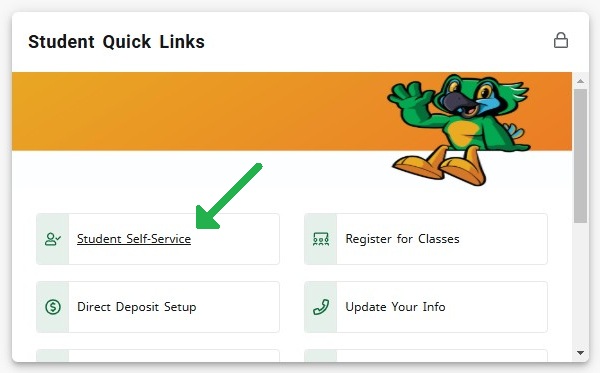
Screenshot of the JSCC jWeb Student Quick Links page showing four buttons: Student Self-Service (highlighted with a green arrow), Register for Classes, Direct Deposit Setup, and Update Your Info. A green bird mascot is visible in the top right corner.


3. Under the Student Accounts section, click on Tax Notification (1098-T)
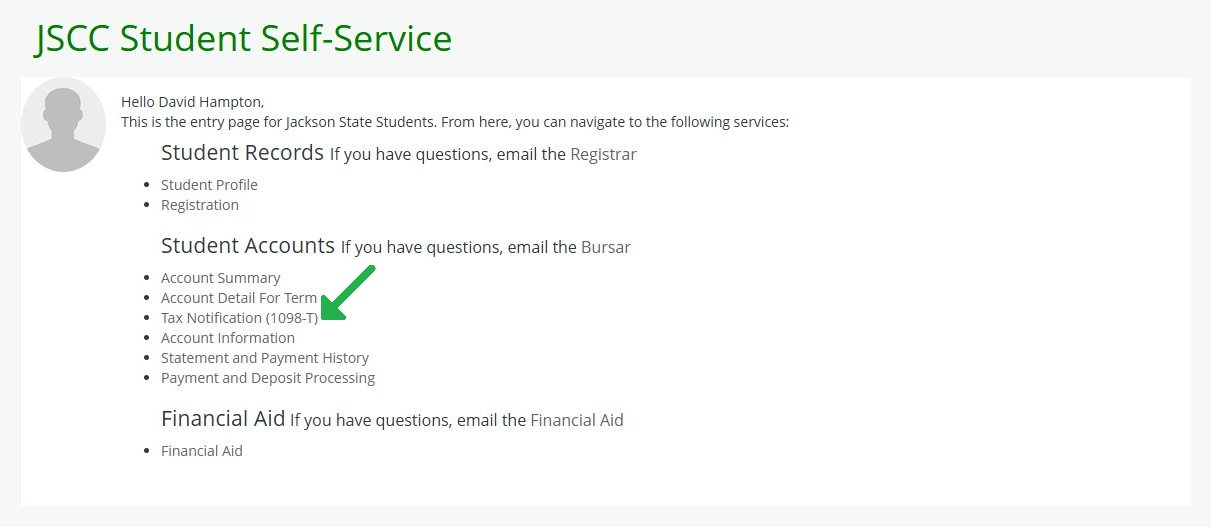
Screenshot of the JSCC Student Self-Service web page showing categories for Student Records, Student Accounts, and Financial Aid. Each category lists related links such as Student Profile, Registration, Account Summary, Tax Notification (1098-T), and Financial Aid. A green arrow highlights the ‘Account Detail For Term’ link under Student Accounts. Contact emails for Registrar


4. Select the current tax year. The 1098-T will display and you can click the print button in the top right corner.


Ready to become a Green Jay?

Let's Get Started!